Governance · 2 min read
Resources
Every assistant and Space across the platform in one list, with model and classification.
Resources is the organization-wide inventory: every assistant and every Space, regardless of who created it or who can see it. It’s how you answer questions that cross Space boundaries — which models are actually in use, whether anything is misclassified, who owns what.
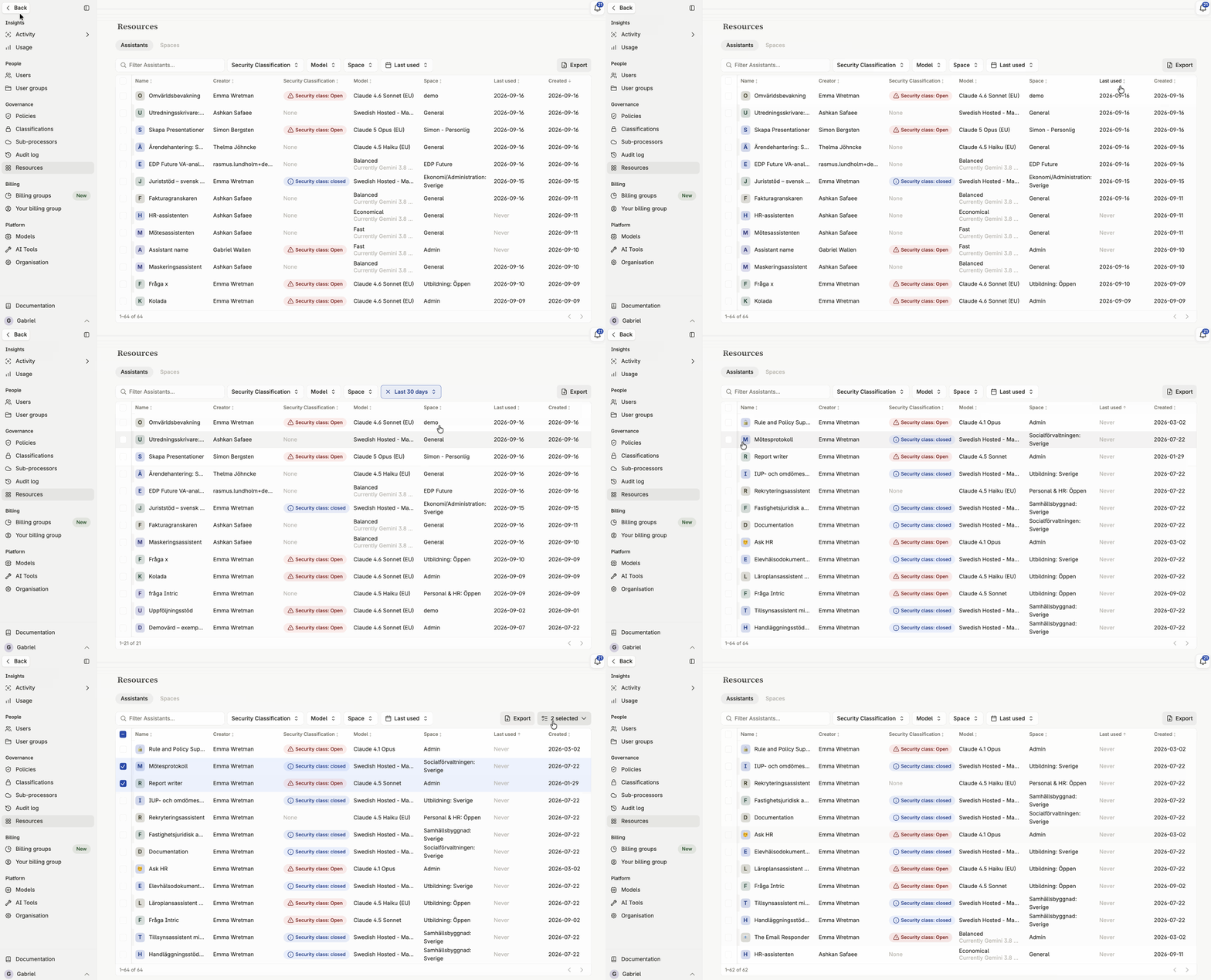
What Resources shows
Section titled “What Resources shows”Assistants
Section titled “Assistants”Every assistant on the platform, with its name, the model it uses, its security classification, who created it, and when it was last used. The last-used column sorts and filters like the others.
Spaces
Section titled “Spaces”Every Space on the platform, with its name, security classification, and members.
Reviewing classifications across the platform
Section titled “Reviewing classifications across the platform”Use the Assistants and Spaces tables together to confirm that classification is applied consistently. Nothing sensitive should be sitting in a Space, or attached to an assistant, with a classification lower than it should have.
Finding unowned or unused resources
Section titled “Finding unowned or unused resources”Sort or filter by creator and by last use to spot assistants nobody seems to be using, or Spaces that have drifted without an active owner — useful groundwork before a cleanup or an access review. Both tables support CSV export for the current view. See Exporting table data as CSV.
Taking over a Space whose admins have left
Section titled “Taking over a Space whose admins have left”When a Space’s admins leave, fall ill or move on, nobody may be left who can manage its members, and its assistants are stuck. An Admin can fix that from the Spaces table: select the people icon, Add members, at the end of the Space’s row, and add yourself or someone else as Space Admin. As a Space Admin you then manage the Space’s members and user groups from its own Members list, like any other Space admin.
An Admin does not get into a Space’s content any other way. Access comes from becoming a member, so the takeover shows in the Space’s member list and is recorded in the audit log. Until then, an Admin who is not a member can’t open the Space’s assistant attachments or its widgets’ knowledge files.
Deleting several assistants at once
Section titled “Deleting several assistants at once”Filter the Assistants table to what you want to clear out — every assistant unused since a given date, for example — then select the rows and delete them in one step, rather than opening each assistant in turn.
Deletion here is the same deletion as anywhere else in Intric: it removes the assistants and their conversations permanently. Export the filtered view to CSV first if you want a record of what was removed.