Insights · 1 min read
Activity
Messages, active users, engagement rings and per-assistant breakdowns for the selected period.
Activity measures engagement: how many messages were sent, by how many people, to which assistants, and how evenly that activity is spread. The engagement rings are the part worth learning to read — they distinguish a broad rollout from a few power users carrying the numbers.
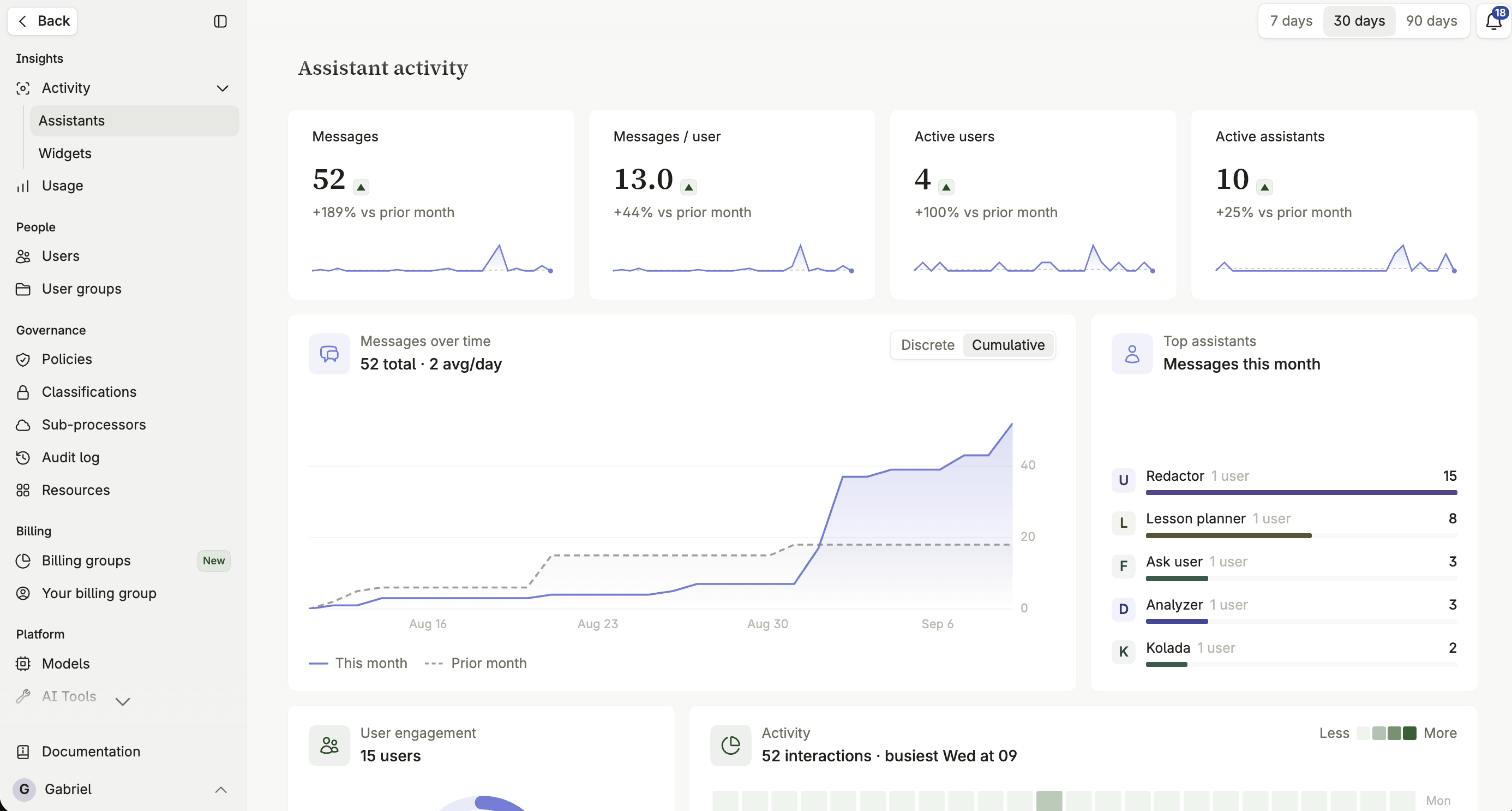
Key metrics
Section titled “Key metrics”A high-level overview for the selected timeframe, alongside a chart of message volume across the period that toggles between a discrete daily view and a cumulative running total.
- Messages — total messages sent, the raw volume of interaction.
- Messages per user — average activity per individual, a rough sense of how deeply people who do use the platform rely on it.
- Active users — unique users who sent at least one message during the period.
- Active assistants — assistants that received at least one message during the period.
User engagement rings
Section titled “User engagement rings”A dual-ring visual for the health of your rollout.
The outer ring
Section titled “The outer ring”Shows how many of your total licensed users have been active in the selected timeframe.
The inner ring
Section titled “The inner ring”Measures how equally usage is distributed — how many users are responsible for half of all messages sent. A closed inner ring means a broad, healthy rollout; a small one means a handful of power users are driving most of the activity.
Assistant analytics
Section titled “Assistant analytics”- Top assistants — the most active assistants by message volume.
- Trending assistants — assistants with the fastest-growing usage, often where organic adoption is happening without central prompting.
- The assistant usage table — a complete, filterable breakdown of every assistant in the organization. Filter it by Space to compare how different departments or teams are using the platform.
Widget activity
Section titled “Widget activity”The same shape of metrics — active widgets, conversation volume, top and trending widgets — applies to widgets alongside assistants, since widget conversations count toward organization activity too. See Widget insights.
What to watch for
Section titled “What to watch for”Use trending assistants to find organically successful assistants worth promoting more broadly. If the outer ring is healthy but the inner ring is small, most of the value is going to a few people — that’s usually a training gap rather than a platform problem.