Introduction · 1 min read
Need more help?
Where to turn when an article does not answer your question: Iris in the chat, the Assistant coach, and the support team.
When an article does not answer your question, you have three places to go next: Iris, the assistant in the chat on every page of the help center; the Assistant coach, for writing instructions; and the support team, by email.
Ask Iris in the chat
Section titled “Ask Iris in the chat”The round chat button in the bottom right corner of every page opens Iris, Intric’s digital assistant. Ask a support question in your own words and in your own language — what a feature does, how to create your first assistant, where a setting lives — and Iris answers in the chat panel.
To close the chat, click the round button again or press Esc.
Get help writing instructions
Section titled “Get help writing instructions”The Assistant coach is an assistant with one job: helping you write the instructions for an assistant of your own. Describe what you want your assistant to do. The coach asks about anything you left open, then drafts instructions you can paste into your assistant, test and revise.
Use it when you know what you want an assistant for but not how to phrase it.
Email the support team
Section titled “Email the support team”For anything Iris cannot answer, email support@intric.ai and a person from the support team picks it up. It helps to include:
- what you were trying to do, and what happened instead
- the page, Space or assistant where it happened
- a screenshot, if you have one
If an assistant shows an error
Section titled “If an assistant shows an error”When an assistant cannot answer, the chat shows an error panel in place of the reply. Its heading says what went wrong, often We encountered an issue. Copy the details from that panel before you email us:
- Click the copy icon in the top right corner of the error panel. Hover over it and it reads Copy diagnostics.
- Paste the text into your email to support.
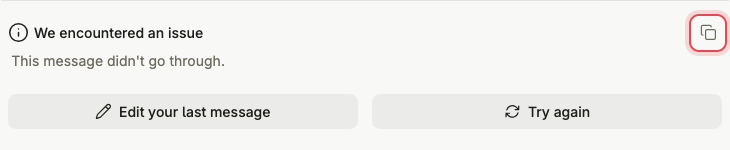
The text holds the error message and code, a trace ID and the language model the assistant uses. It also holds the IDs of your account, your organisation and the assistant, and the time the error happened. None of your conversation is in it. With the trace ID, the support team finds that exact request instead of asking you to reproduce the error.