Build Your First Assistant · 2 min read
Step 3: Knowledge
Attachments, knowledge sources, web crawling, and web search.
Language models only have general pre-trained knowledge by default. To answer your specific questions, the assistant needs your data.
Give the assistant knowledge
Section titled “Give the assistant knowledge”You can give the assistant knowledge in several ways:
Attachments: Upload smaller files you want the assistant to keep in its context window — meaning it reads them through every time you ask a question. For example, a best-practice report it should reference when writing a report, or formatting and communication guidelines. Excel files are an exception: they are uploaded as attachments but are not included in the context window, because specialised tools are activated under the hood to help the model handle that type of data correctly.
Knowledge sources: Here you can upload much larger datasets. Intric uses a technique called RAG, meaning you can give the assistant access to a large library of information and it will select the relevant chapter for your question — instead of holding the entire library in its context window.
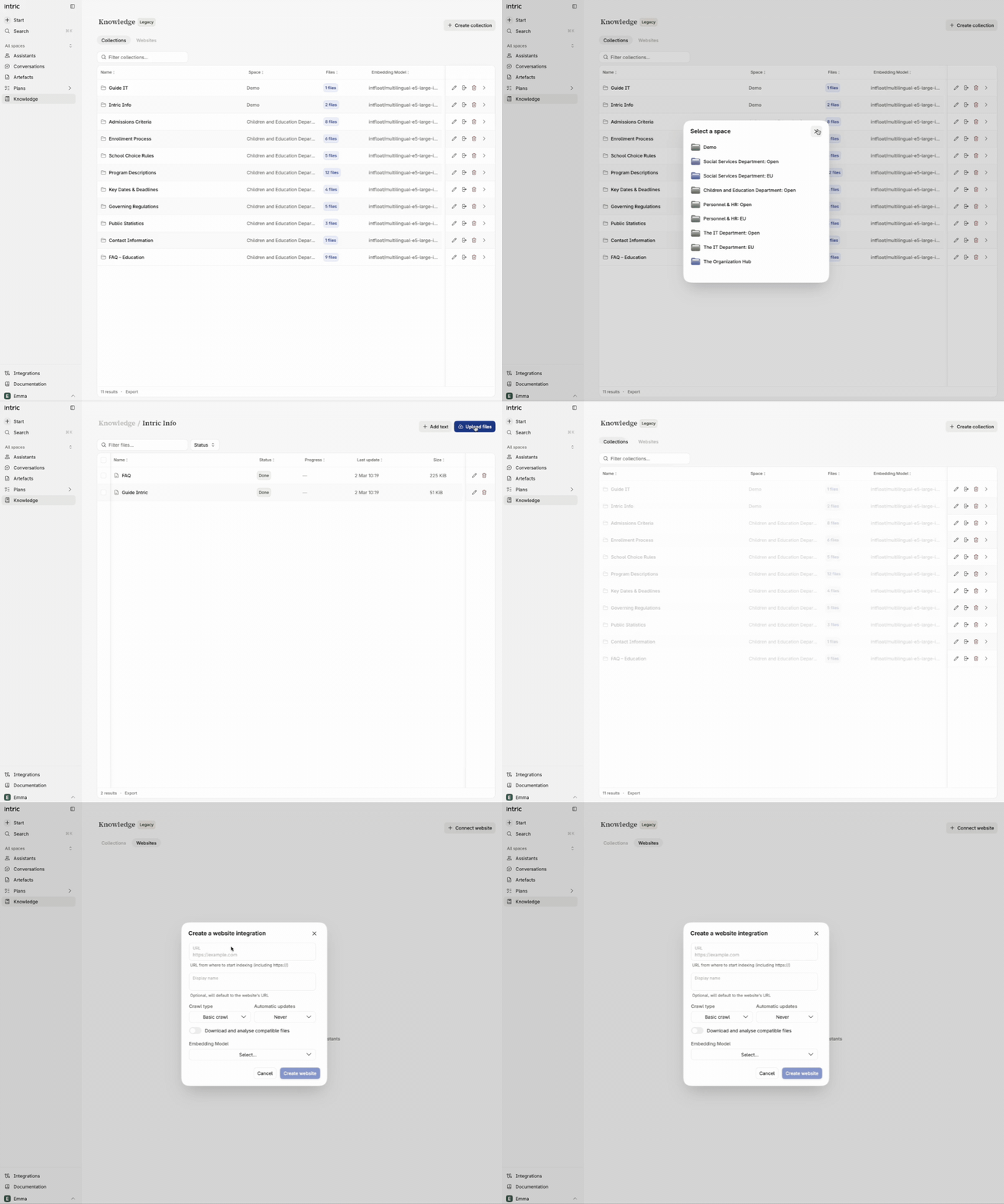
To add knowledge to your assistant you first need to upload it to the knowledge library. Go to Knowledge in the left menu → Create a collection (a folder) → choose your Space → upload your files. Best practice is quality over quantity — the better and more relevant data you add, the better your results will be.
In Knowledge you can also crawl websites as a knowledge base. Crawling a page scrapes all information from it and saves it to the knowledge library. Think quality over quantity: adding a main domain will crawl all subpages. Go directly to the relevant subpages and start the crawl from there instead. You can choose whether a page should be crawled once or weekly.
Note that not all pages can be crawled depending on their technical setup — those pages can alternatively be reached via web search (more on that below).
Not sure where to put your files?
- Is it an Excel file? → Attachments
- Is it a text document? → Try knowledge sources first
Note: We will soon update the Knowledge section in Intric so that there is only one place to upload — Intric will then sort the information correctly under the hood.
Connect knowledge to the assistant
Section titled “Connect knowledge to the assistant”Once you have uploaded your knowledge to the library, you can give your assistant access to it. Click Knowledge source and select the relevant collections. Under knowledge sources you will also find knowledge tools — integrations to open data sources built by Intric.
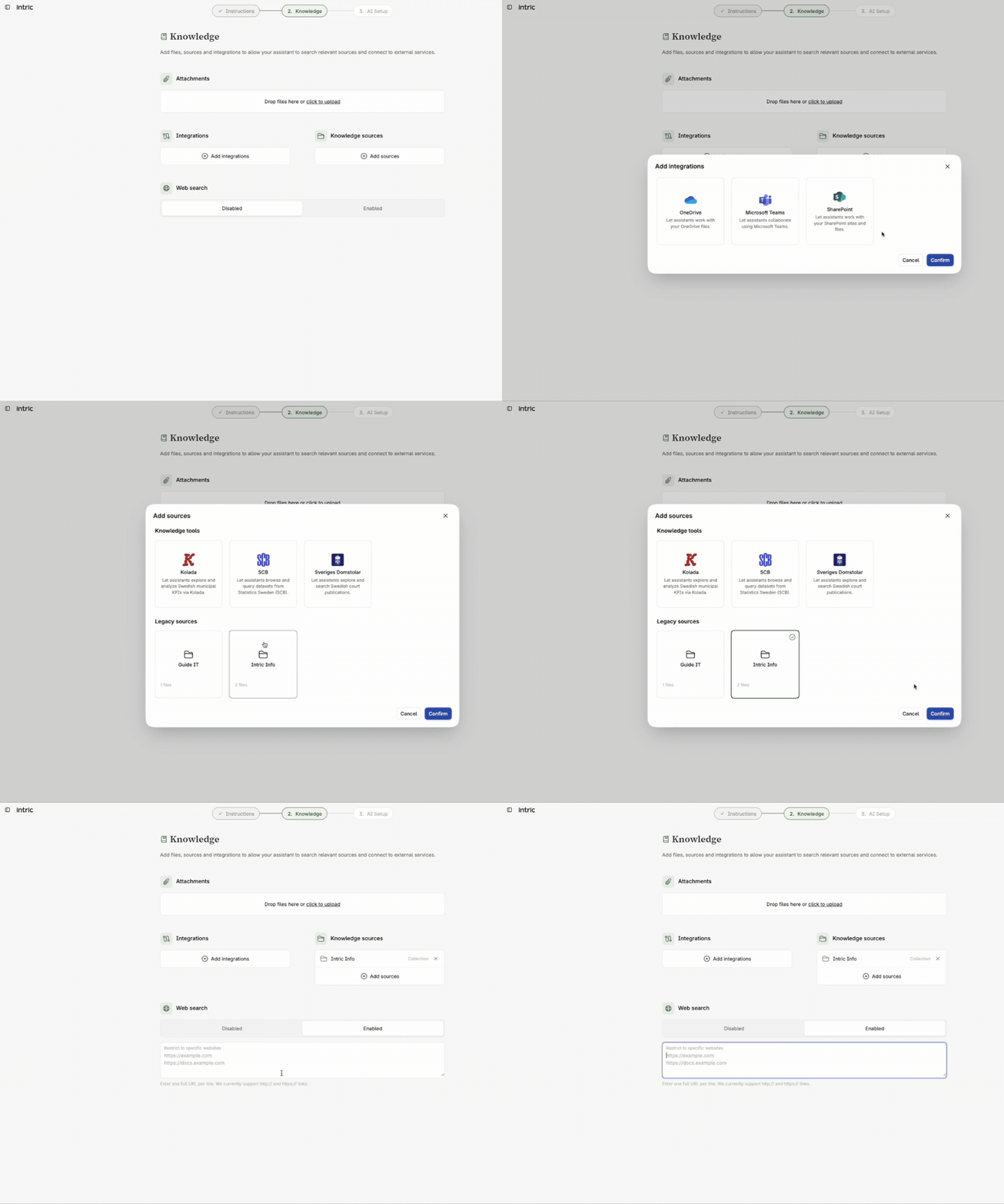
Tip: Wondering what an integration or knowledge source gives access to? Add it and then ask the assistant in chat what information it has access to and how it can help you.
Integrations: If your administrators have enabled integrations to login-protected data sources, you will find them here. The first time you use an integration you need to log in via your profile icon at the bottom left → Profile → Integrations.
Enable web search: Let the assistant search the internet — freely or targeted at specific URLs you point to. Without this enabled, the assistant cannot retrieve information from the internet.
Note: Which integrations you see depends on what your administrator has enabled for you or your Space.
Test your knowledge
What technique is used in knowledge sources to handle large datasets?