Functionality · 2 min read
Plans
Automate multi-step workflows that run in the background — manually or on a schedule.
With Plans you automate multi-step workflows that run in the background. A Plan is made up of steps that run one after another, so you can streamline repetitive tasks and longer processes without staying in the chat.
Plans are built for work that is too heavy for an ordinary chat interaction — going through an extensive document library, or processing large volumes of data. They can also run on a recurring schedule, which makes them well suited to ongoing monitoring: checking industry news every week, or tracking changes to regulations that affect your organisation.
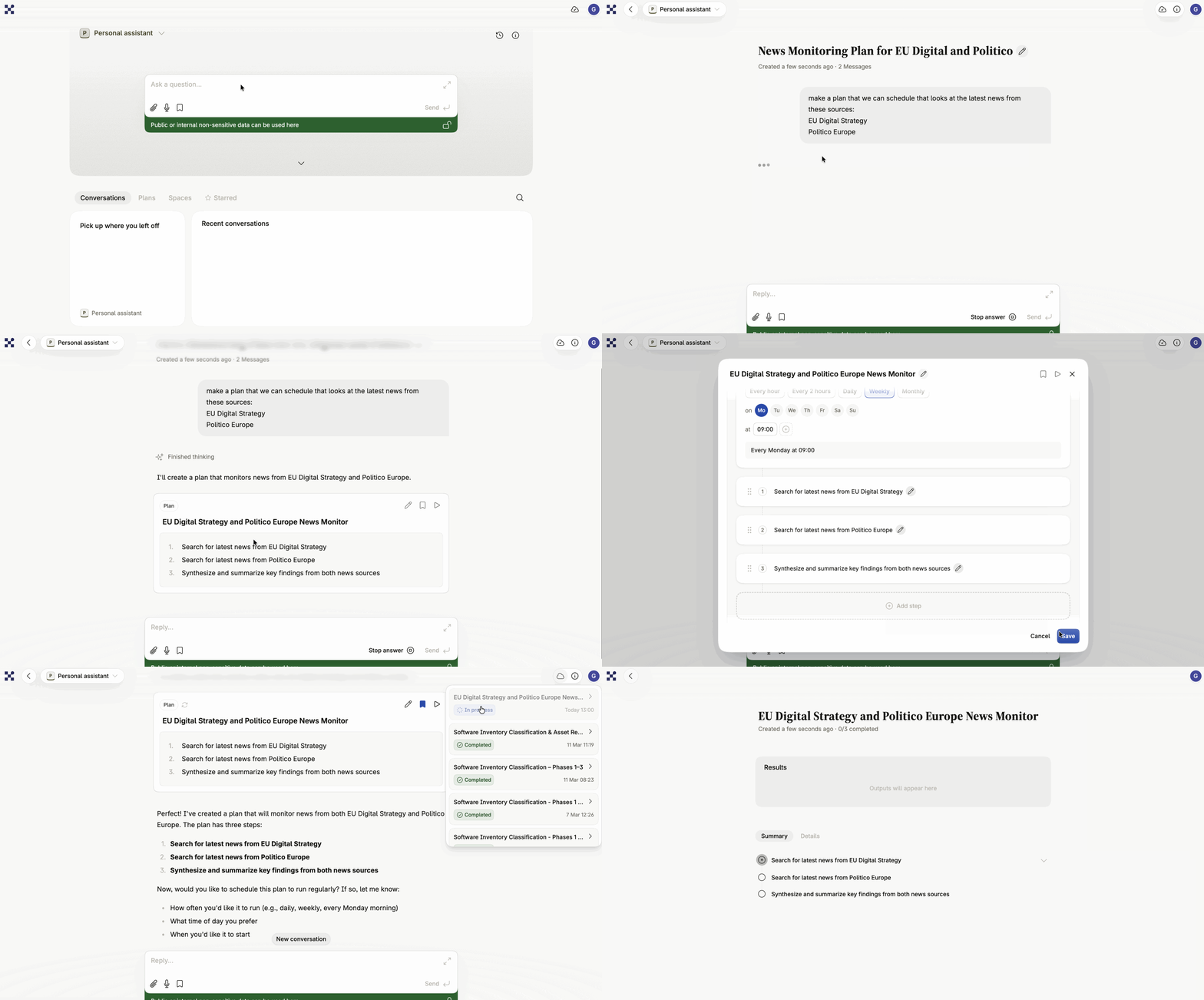
How a Plan works
Section titled “How a Plan works”A Plan always belongs to one specific user and one specific assistant. Once created, it becomes available for that assistant and can be started from any conversation within it.
A Plan has three parts:
- Steps — the individual tasks, run in order.
- Step configuration — per-step settings: which action type the step performs and what input it expects.
- Schedule (optional) — automatic recurring runs.
Plans and artifacts
Section titled “Plans and artifacts”Plans are effective when content has to be built up across several steps. They can create and update artifacts (documents or files) during a run: if step 1 creates an artifact, step 2 can pick it up and build on it. That lets a document take shape iteratively within a single run.
Beta status and current limits
Section titled “Beta status and current limits”Plans are currently a beta feature. Contact support@intric.ai to request access.
The feature is under active development, so the limits below are likely to change:
- Sequential only — one step at a time, no parallel processing.
- No partial restart — a failed Plan cannot be restarted from a given step; the whole Plan re-runs.
- No chat continuation — once the Plan finishes, the interaction for that run ends.
- Per-step file upload — files are uploaded step by step rather than for the whole Plan at once.
- Artifacts cannot be edited directly — if you are not happy with the result, adjust the Plan instructions and run it again.
Getting a Plan right
Section titled “Getting a Plan right”- Write explicit instructions. Steps run in isolation. Do not assume the assistant remembers anything from “the conversation” unless it is in that step’s own prompt.
- Use expected input so a Plan never starts without the files it needs.
- Test manually first. Run the Plan by hand and check the result before setting up a schedule.
- Think in action types — write, search, analyse — when you break the work into steps.
Read more in the help center: Plans and Scheduling.
Test your knowledge
Question 1 of 2
What separates a Plan from an ordinary conversation with an assistant?