Personal Assistant
The personal assistant (chat) is the view that all users encounter first in the platform. As an administrator, you play a crucial role in shaping this experience so it becomes both powerful and secure. Here you control the global default settings that apply to all users’ individual chat interfaces.
The personal assistant will be employees’ daily “AI partner.” By optimizing the settings here, you can lower the threshold for use and ensure that the technology is used in a way that follows the organization’s guidelines without hindering productivity.
Who can configure these settings
Section titled “Who can configure these settings”Only administrators (the Owner role) can change the organization’s personal assistant configuration. Because these settings apply to every user’s chat at once, treat them as a shared, high-impact configuration rather than an individual preference.
Centralized control and security
Section titled “Centralized control and security”As an administrator, you have the authority to adjust the settings for this chat to ensure that permissions and security levels are always followed.
- Model control: Limit which language models are selectable for the personal chat. This prevents users from inadvertently using models that don’t meet the organization’s requirements, for example regarding data storage location.
- Compliance: By locking the chat to specific security classes, you ensure that employees always work within the frameworks the organization has set up for different types of data.
Organization-wide instructions
Section titled “Organization-wide instructions”In addition to controlling models and security classes, you can give the personal assistant a set of organization-wide instructions that apply to every user’s chat. This is a shared instruction layer that shapes how the assistant responds by default, without each user having to configure anything themselves.
Typical uses include:
- Tone and style: Establish a consistent voice, for example professional and concise, or warm and supportive.
- Language style: Specify a preferred response language or reading level, so answers match how your organization communicates.
- Accessibility-oriented language: Ask the assistant to use plain language, avoid unnecessary jargon, and explain abbreviations — helpful for a broad internal audience.
How this differs from a regular assistant’s instructions: On a regular assistant, the prompt (instructions) is tied to that single assistant and only affects the people who use it. Organization-wide instructions on the personal assistant apply to the personal chat of every user in the organization. They set a baseline behavior rather than solving a specific task, so keep them broad rather than narrowly prescriptive.
Governance before changing shared behavior
Section titled “Governance before changing shared behavior”Because these settings affect everyone at once, keep a few things in mind before making changes:
- Change deliberately: Coordinate wording changes with the relevant stakeholders rather than editing ad hoc, since every user sees the effect immediately.
- Keep instructions broad: Avoid task-specific or overly restrictive instructions that could get in the way of the wide range of things users do in the personal chat.
- Communicate changes: Let users know when default behavior changes, so a new tone or language does not come as a surprise.
- Review periodically: Revisit the instructions as your guidelines evolve.
Recommended settings for optimal benefit
Section titled “Recommended settings for optimal benefit”To give users the best possible start, use the following configuration:
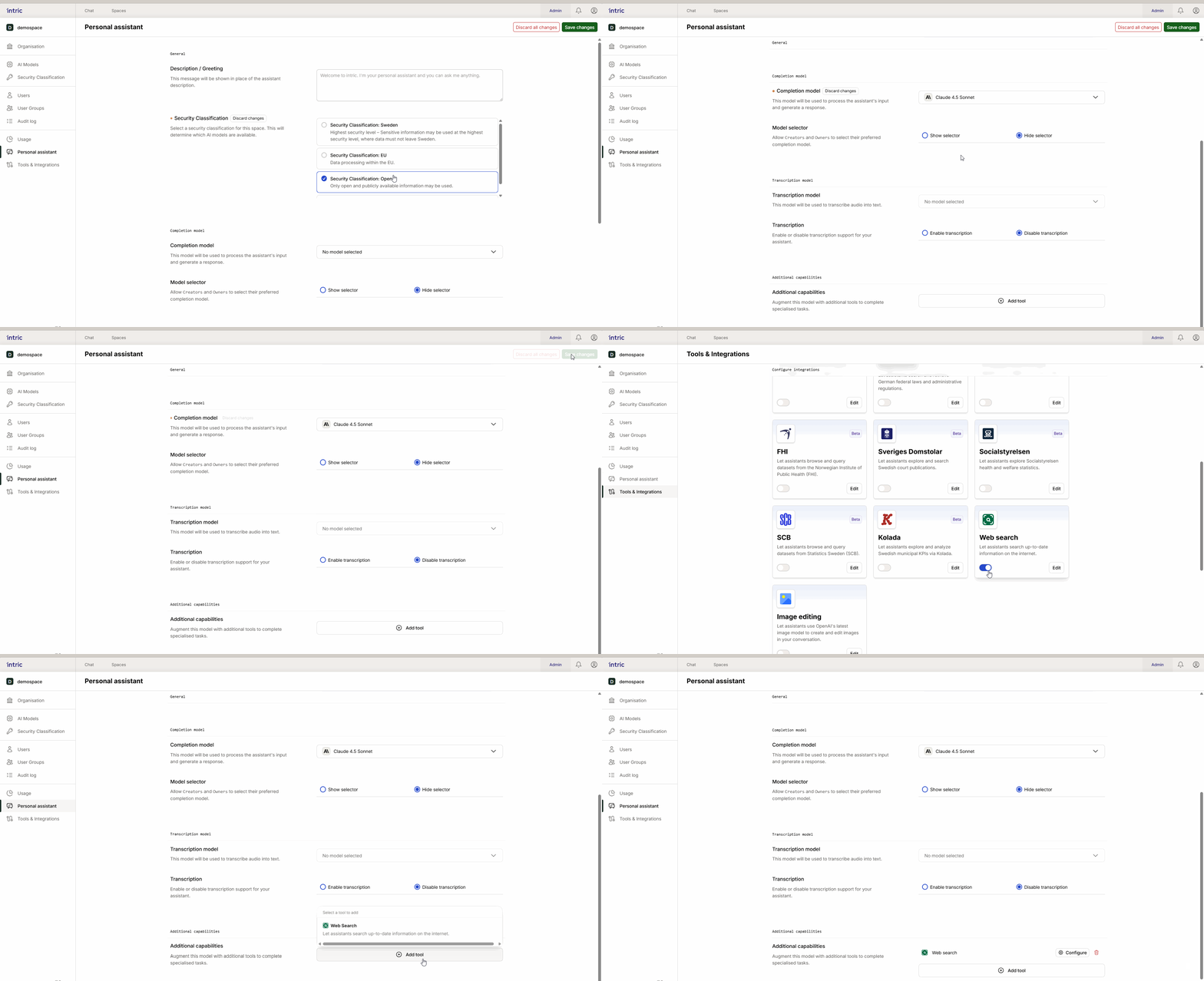
- Security level: Place the personal chat in an “Open” security class. This is suitable for general questions and everyday tasks that don’t involve sensitive information.
- Model selection: Choose a fast and efficient model as default. Speed is often more important than extreme analytical ability in the personal chat for the user to get immediate feedback.
- Enable Web Search: For maximum user benefit, enable the Web Search tool by default. This allows the assistant to fetch current information from the web, which is one of the most appreciated features in daily work.
Transparency for end users
Section titled “Transparency for end users”Users must understand which rules apply to their chat. In the interface, there’s an info icon (i) that users can click to see which settings, models, and security classes are active. This creates confidence that they know exactly what type of information they can handle in the chat.