

Release 2026-04-17 (1.96.0–1.98.3)
Backend: 1.174.0–1.179.0
Frontend: 1.96.0–1.98.3
Release period: 2026-04-10 to 2026-04-17
👀 Coming soon
Section titled “👀 Coming soon”New user interface
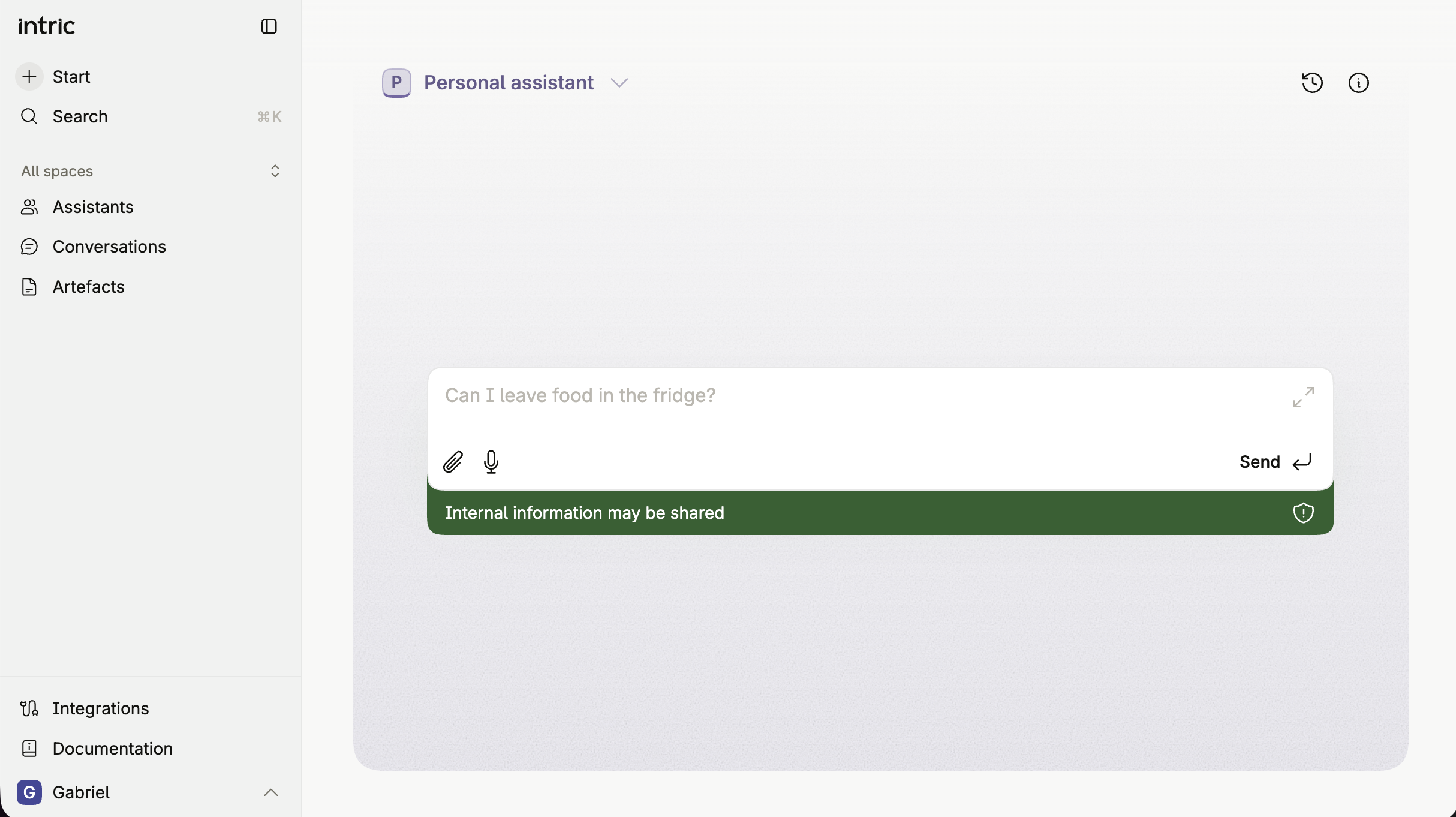
Section titled “New user interface”The redesigned interface will go live on Monday 20 April 2026, in the evening. The update introduces a new sidebar structure with dedicated sections for Conversations, Artefacts, Plans, and Assistants, as well as quick access to Integrations and Documentation. The active assistant is shown in the top bar with a dropdown for easy switching, and the current security classification is always visible directly below the chat input.
Navigation is built around a new command palette (⌘K), which lets you search across conversations, assistants, plans, and more from anywhere in the platform.
Read more in the Help Center:
🚀 New features
Section titled “🚀 New features”Intranet crawler
Section titled “Intranet crawler”Intric now supports crawling and searching your organisation’s internal intranet directly from an assistant. Built on the MCP standard, the Intranet crawler lets you index login-protected intranet content — such as employee handbooks, policy documents, and internal wikis — and make it searchable within Intric conversations.
Key capabilities include:
- Search Intranet — Assistants can search indexed intranet content and return relevant results in response to user queries, respecting the permissions of the configured service account.
- User-suggested corrections — Users can flag outdated or inaccurate content. Suggestions are routed to administrators for review and approval before changes are applied.
Security classification rules apply to the Intranet crawler in the same way as other tools in Intric.
📧 Contact support@intric.ai to initiate setup. Read more about the Intranet crawler in the articles below.
Intranet crawler Installation and configuration guide
Assistant configuration warnings
Section titled “Assistant configuration warnings”When an assistant cannot respond due to a configuration problem — for example because its model has been disabled or a security classification has changed — Intric now surfaces this issue before a conversation begins, rather than after sending a message.
- Creators and Collaborators will see a highlighted indicator in the assistant settings, guiding them directly to the setting that needs attention.
- Users will see the chat input disabled with a clear message indicating that the assistant needs to be reconfigured by its owner.
This feature is available in the updated interface (V4).
New model: Claude Opus 4.7
Section titled “New model: Claude Opus 4.7”Claude Opus 4.7 is now available and can be activated by your organisation’s administrator.
🛠️ Improvements and updates
Section titled “🛠️ Improvements and updates”First message saved immediately
Section titled “First message saved immediately”When you start a new conversation, your message is now saved as soon as you send it — before the assistant has responded. If you navigate away and return, your message will already be there, along with any file that is still being processed.
Conversations stay consistent when re-opened
Section titled “Conversations stay consistent when re-opened”A bug where re-opening a conversation could show an older version of the exchange — missing messages you had sent in a previous session — has been resolved. Conversations now accurately reflect all messages you have sent, without needing to refresh the page.
Improved context handling for long conversations
Section titled “Improved context handling for long conversations”The way Intric manages conversation history within an AI model’s context window has been updated. Earlier messages are now compressed more consistently, which helps maintain reliable responses over extended conversations.
Artifact display fixed in long conversations
Section titled “Artifact display fixed in long conversations”A bug where artifacts would get stuck in a loading state in long conversations has been resolved.
🏢 On-premise information
Section titled “🏢 On-premise information”The updates in this release require an update to be available for on-premises installations.
🟢 Seamless upgrade — No configuration changes required.
📧 If you have questions about the update, please contact support@intric.ai.