Security Training
Agenda
-
01
Platform Walkthrough
AI model view and security classifications
-
02
Security Configuration
Define hierarchical security classes and assign AI models to each class
-
03
Working with Sensitive Information
Plan for handling different data types and internal communication about security
-
04
Risk and Impact Assessments
Discussion of organizational requirements
-
05
Data Processing Agreements
Review and finalize DPAs as needed
What We'll Achieve Today
Psychological & Operational Safety
Build a foundation of trust through clear security classifications that give everyone confidence in where and how AI can be used
Remove the Fear-Blocker
Provide safe ground to start innovating by showing exactly what data can be used where, enabling your teams to say "yes" to AI
Enable Smart Decision-Making
Create different "rooms" for different use cases - work safely with public data in one space, sensitive data in another
Compliance Made Simple
Configure the framework once as admins, so your users don't have to think about compliance - it's built into the platform
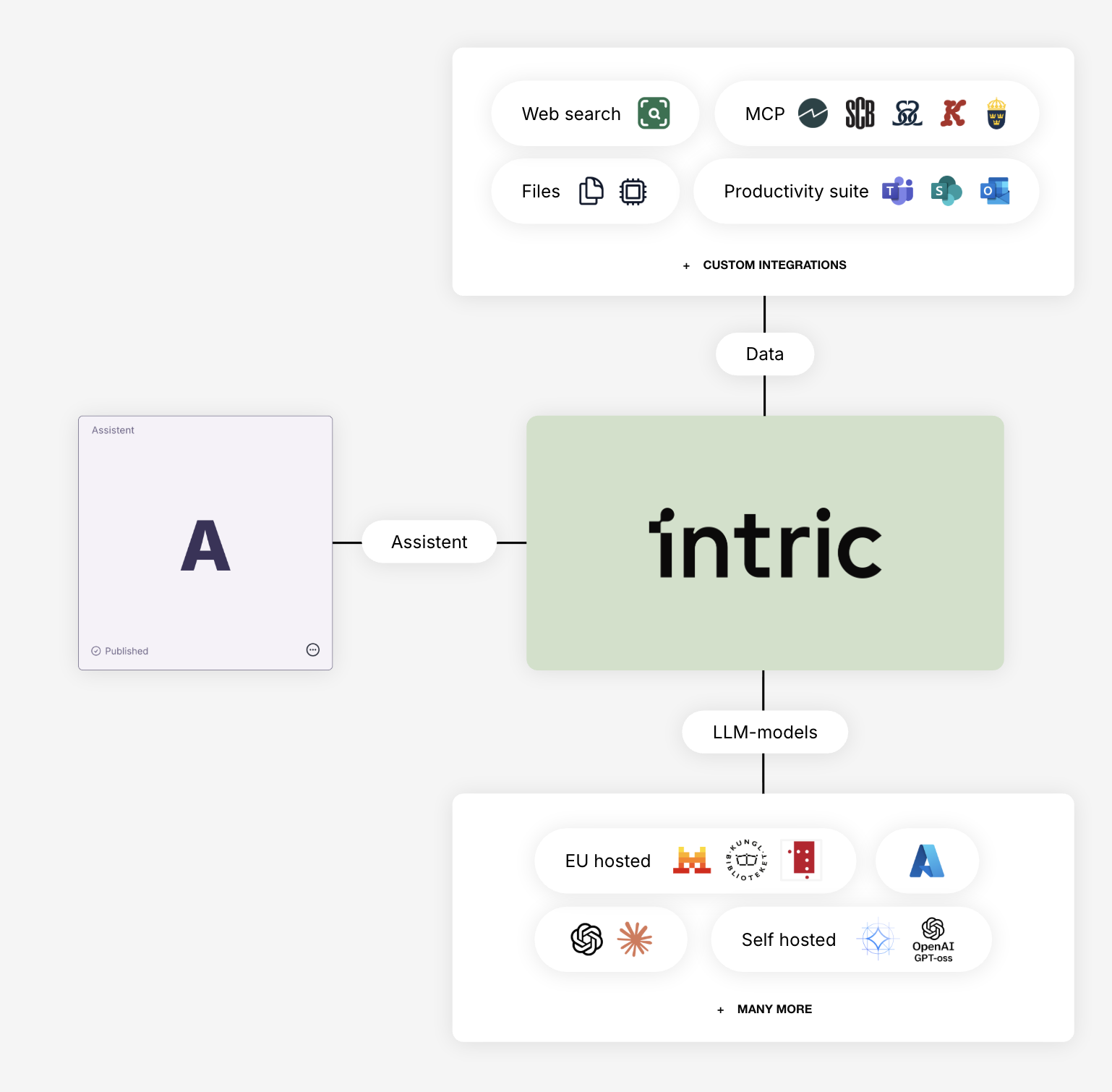
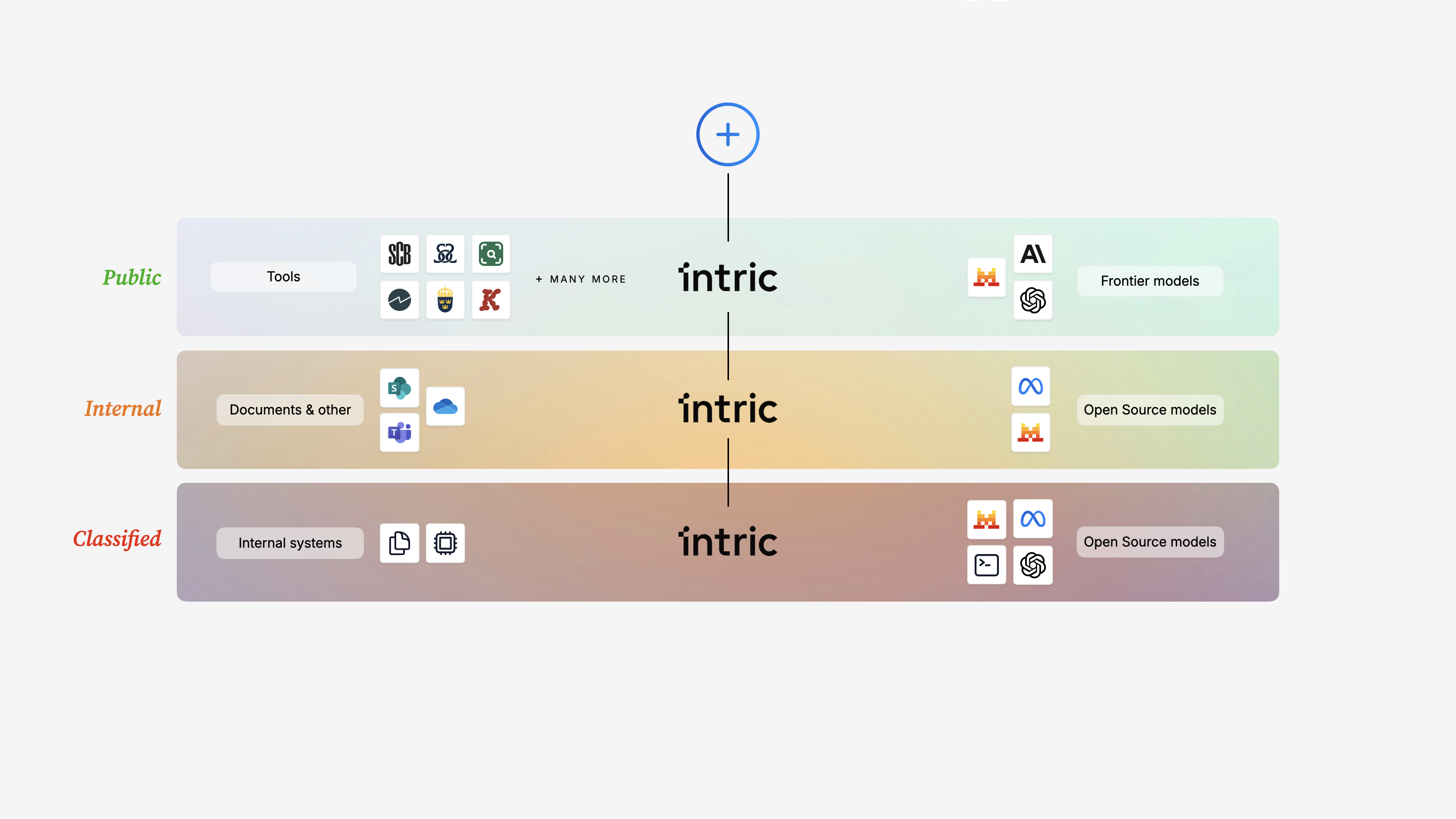
Security Classifications
🏠 Think of Spaces as Different Rooms
Different processes have different requirements for functionality, integrations and security. In Intric, you can create different spaces that function as different rooms. Security classes create different rules for these rooms.
- 🟢Open Room - Public data, full functionality and AI models available
- 🇪🇺EU Room - Data stays within EU, specific model selection
- 🇸🇪Sweden Room - Data stays in Sweden, most restricted model selection
📊 Hierarchical Structure
Highest class at the top: Sweden → EU → Open. Models permitted in a higher class are automatically available in lower classes, but not vice versa.
💡 Recommended Starting Point
- 🎯Start with Open Information - Create one security class for public/open data to get started quickly
- 🔍Find Low-Hanging Fruit - Let teams discover valuable use cases without high barriers
- 📋Build Strategy in Parallel - While users test, admins develop plans for sensitive data handling
- 🔒Expand Gradually - Add more security classes as your strategy and routines mature
🛠️ You Configure Once, Users Work Safely
As admins, we set the rules. Your users simply work in the right room for their task - compliance is automatic.
Working with Sensitive Information
🔍 What Data Will You Process?
Think short-term and long-term:
- 🟢Non-sensitive Information - Public documents, published reports, general information
- 📋Personal Data - Names, email addresses, contact details
- 🔐Specially Protected Personal Data - Personal identity numbers (personnummer), coordination numbers
- ⚕️Sensitive Personal Data - Health information, social services cases
🎯 Create Clear Labels
If you only allow "Open information", make sure your security class label clearly informs users about this restriction (e.g., "Open Data Only").
💬 Internal Communication Strategy
- 📢Clear Guidelines - Communicate which rooms (spaces) are for which data types
- 🎓User Training - Help employees understand when to use which space
- ❓Support Channels - Establish where users can ask questions or request exceptions
- 📊Regular Updates - Keep communication fresh as your AI strategy evolves
⚖️ Enabling "Yes"
The goal isn't to block AI use - it's to provide clear, safe paths forward. Give IT and Legal the tools to say "yes" to specific use cases.
Risk Assessment & Data Processing
📄 Data Processing Agreements (DPA)
- 📝Purpose & Scope - What data is processed and why (based on your planned use)
- 🔒Security Measures - Technical and organizational safeguards Intric has in place
- 🌍Data Location - Where data is processed (aligned with your security classes)
- 👥Sub-processors - AI model providers (documented in our resources)
- ⏱️Retention & Deletion - Data lifecycle management
🤝 DPA Support
Intric provides comprehensive DPA guidance and supporting documentation to make legal review straightforward.
📋 Impact Assessment Discussion
- 🔍Personal Data Scope - What personal data will be processed? How sensitive is it?
- ⚖️DPIA Requirement - Does your organization need a Data Protection Impact Assessment?
- 📊Organizational Requirements - What are your specific risk tolerance levels and compliance needs?
- 🔐Security Standards - Industry regulations, internal policies, legal mandates
🎯 Risk Mitigation Built-In
Security classifications are your primary risk control - they ensure data is only processed by appropriate AI models in appropriate contexts.