Websites
It’s possible to connect external websites to Intric to use their information as part of the assistants’ knowledge base. By indexing (crawling) a website, the assistant can answer questions based on specific content from your organization, documentation pages or public resources.
How to do it
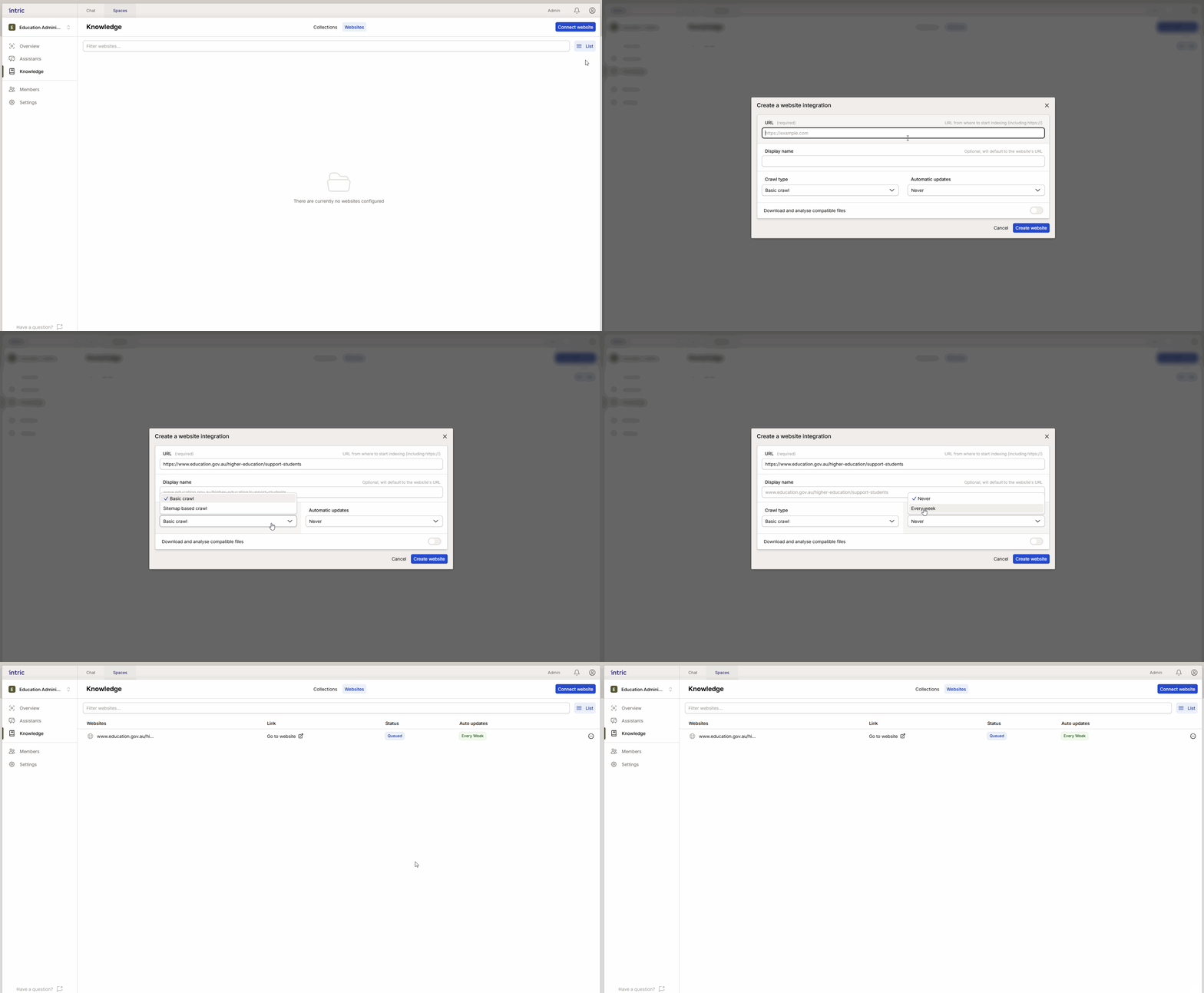
Log in to Intric and locate “Websites” in the top menu.
Click the “Connect website” button.
Fill in the information in the configuration window:
URL: Paste the link to the selected website.
Crawl method: Choose the method that best suits the purpose (see explanation below).
Text embedding model (Embedding): Select model.
- Best practice: Activate only one embedding model per security class to avoid uploaded knowledge becoming inaccessible when switching models.
Update interval: Choose how often Intric should fetch new information from the page.
Tip: A more specific URL often gives better results. It’s more efficient to choose a subdomain or specific path with relevant information (e.g.,
intric.ai/docs) rather than an entire website (intric.ai).
Deep dive: Method – Crawling
Crawling means that Intric systematically reads the pages on a website. There are two methods to control how Intric finds content:
- Basic Crawl: Intric starts at the specified URL and then follows internal links to discover new content. It works roughly like a human visitor clicking from page to page.
- Sitemap: Intric reads the website’s own “table of contents” (a sitemap.xml file). This is efficient for very large websites, but requires that the website has a correctly configured sitemap file.
| Method | Advantages | Disadvantages |
|---|---|---|
| Basic Crawl | Self-sufficient & Comprehensive: Automatically finds all content a user can see. Requires no technical configuration of the website. | Resource-intensive: Takes longer to index an entire page and there’s a risk that irrelevant pages are crawled if you don’t limit the depth. |
| Sitemap | Fast & Exact: You have full control over exactly which pages are indexed via an xml file. Very efficient for large websites. | Technical dependency: Requires that the website has a correctly updated sitemap file. Finds nothing that’s missing from the list. |
Recommendation: In the vast majority of cases, use “basic crawl”. It requires no technical preparation of the website and ensures that the assistant finds all content that’s visible to a regular user.