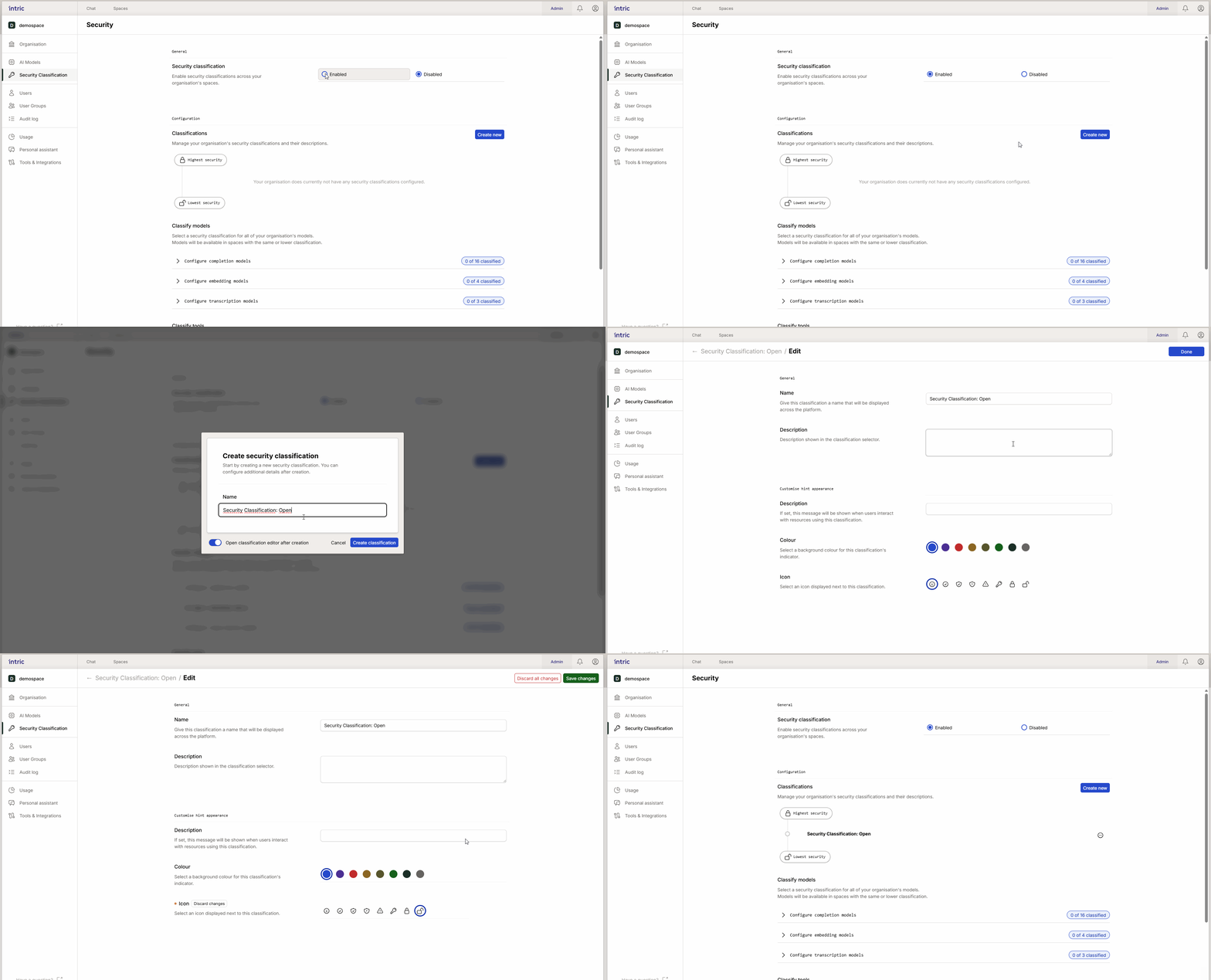
Configuration and Ranking
A security class defines which models and tools can be used for a certain type of data. By assigning a Space a specific security class, you automatically limit what users can do and what type of information can be uploaded there.
Hierarchical ranking
In Intric, security classes are ranked hierarchically. This means that security levels are not isolated islands, but work in a chain where settings and permissions are inherited downward.
- Logical order: Name and think of classes from bottom to top (e.g., Open → Sensitive → Confidential).
- Inheritance principle: Settings are inherited downward in the hierarchy. If a language model or tool is approved for a high security class (e.g., Confidential), it automatically becomes available and selectable for all underlying levels (Sensitive and Open). The reverse, however, does not apply—a tool approved for Open level can never be used in a Confidential space.
- Automatic handling in the interface: When you create and sort your security classes in the administration view, Intric handles the logic for you. By dragging and dropping classes in the right order (highest security at the top), you inform the system how inheritance should occur. You therefore don’t need to manually activate the same model in each individual class if it’s already approved at a higher level.
Important: Security classes must be in the correct order in the list, with the highest security level at the top. This is critical because the platform reads the list from top to bottom to understand the prioritization and inheritance order.